Amazon Vine Login: 2026 Guide
+
Table of Contents
- 1 What Is Amazon Vine and How Does It Help Buyers and Sellers?
- 1.1 Amazon Vine Login process
- 1.2 How to Resolve Amazon Vine Login Errors
- 1.3 How Reviewers Find the Dashboard
- 1.4 Vine Invitation Email Link
- 2 How Sellers Access the Dashboard
- 2.1 Important Rules for Sellers
- 2.2 History of the Amazon Vine Program
- 2.3 How Much Fee Does a Seller Pay for the Amazon Vine Program?
- 3 Quick Summary
Amazon continuously introduces new features and programs to better connect buyers and sellers. One of its biggest strengths is providing a platform where customers can easily purchase products while sellers can smoothly deliver them.
Similarly, Amazon launched a program called Amazon Vine. In this article, I will explain this program in detail. Before discussing the Amazon Vine login process, let’s first try to understand what this program actually is.
What Is Amazon Vine and How Does It Help Buyers and Sellers?
This is an excellent initiative by Amazon that was specially introduced for new sellers. For example, imagine a new seller wants to launch a new wireless headphone in the market. In the beginning, the seller will list the product in the Amazon Vine program. This program includes many reviewers who work on the basis of honest reviews.
The seller provides the headphones to these reviewers free of cost. They use the product and then share their honest feedback and experience. These reviews are displayed publicly and play an important role in increasing the product’s visibility in the market.
At the same time, potential buyers get the opportunity to read real reviews before purchasing the headphones. This is how the process works, making it beneficial for both buyers and sellers.
Now let’s look at the Amazon Vine login process and the important things you should keep in mind while creating an account.
Amazon Vine Login process
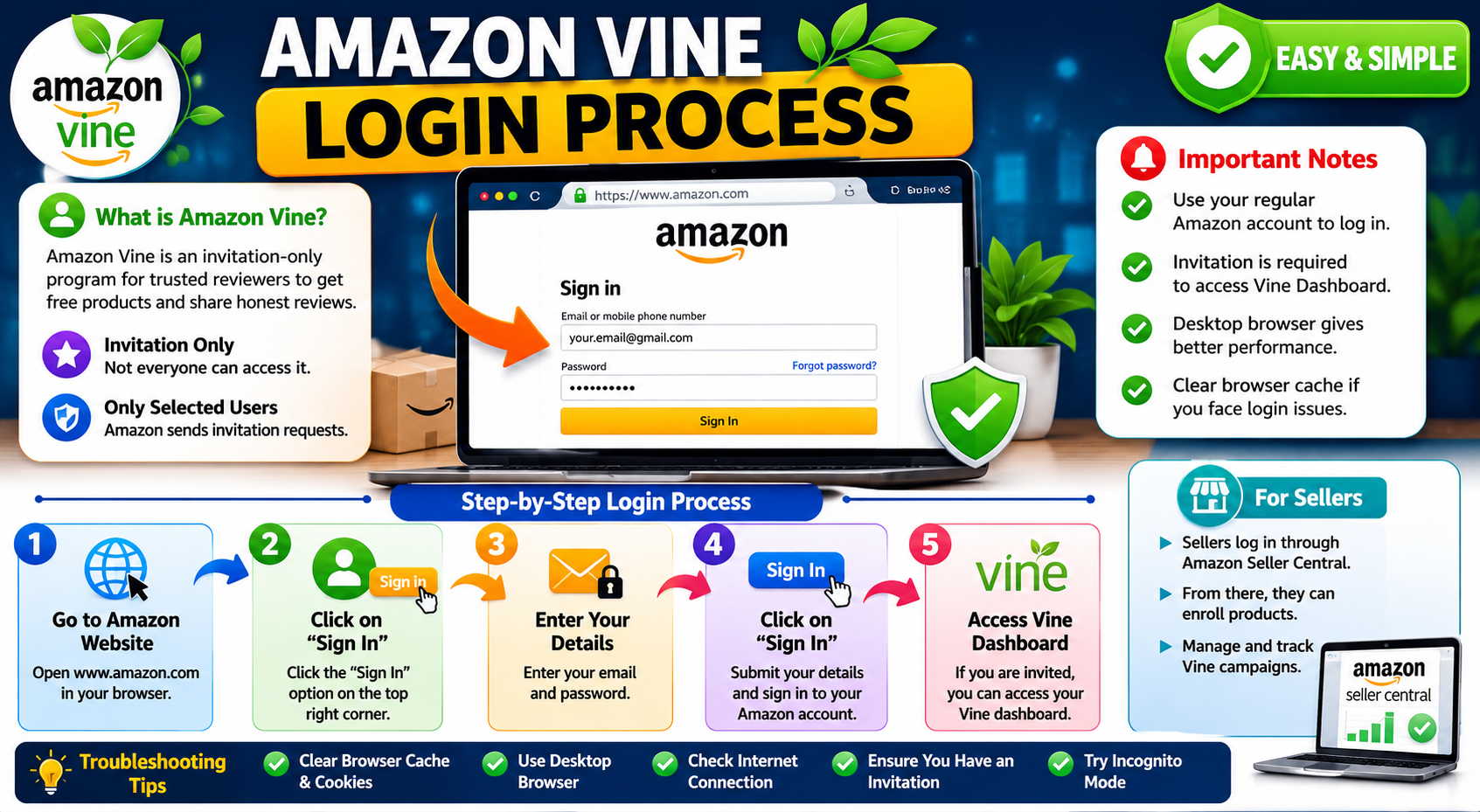
The Amazon Vine login process is not complicated at all. With just a little information, you can easily access it. I have personally experienced this process, and based on that experience, I will guide you here in very simple words.
First of all, to access Amazon Vine, you need to sign in to your regular Amazon account. For this, go to the Amazon website and click on the “Sign In” option. Just like you normally log into your account, enter your email address and password, and sign in.
You should keep in mind that this is an invitation-only program, so only selected users can access the Amazon Vine dashboard. If Amazon has not sent you an invitation request, you will not be able to access the portal.
Later in this article, I will explain in detail Amazon’s policy and what kind of users usually receive invitations for the program.
Now let me explain how sellers can log in. Their process is slightly different because they access the program through Amazon Seller Central. From there, they can enroll products and manage campaigns for customer reviews.
If you are facing login errors, the issue could also be related to your browser cache. From my experience, desktop browsers usually provide a much better experience compared to mobile devices.
How to Resolve Amazon Vine Login Errors
Sometimes errors appear during the login process. However, from my experience, these kinds of issues are very common, and resolving them is not very difficult. One of the biggest reasons behind login errors is entering the wrong password. Even a single incorrect password attempt can cause the system to show an error message.
Sometimes users also enter the wrong email address while signing in. Many people have multiple Amazon accounts with different email IDs. If you try to log in using a different email address with the wrong password, the system will display an error.
I have also noticed that many users face problems with two-step verification. Sometimes the verification code does not work properly, or it takes time to arrive on your mobile device. In such situations, you should wait for a few moments and try again. This is usually not a major issue and can be resolved easily.
If you continue entering incorrect login details repeatedly, Amazon may temporarily block your account for security reasons. In that case, you should wait around 30 minutes and then try signing in again with the correct credentials. Your account should then log in successfully.
How Reviewers Find the Dashboard
After logging into their Amazon account, reviewers can directly access the “Accounts & Lists” section. You will find this option in the top-right corner of the dashboard. If your account has received a Vine invitation, it will appear there. From this section, you can view different Vine invitations and continue working on them.
Vine Invitation Email Link
One of the easiest methods is to log in through the official email sent by Amazon. The invitation email usually contains a direct link that takes you to the Vine portal. From there, reviewers can access products, use them, and submit honest reviews based on their experience.
How Sellers Access the Dashboard
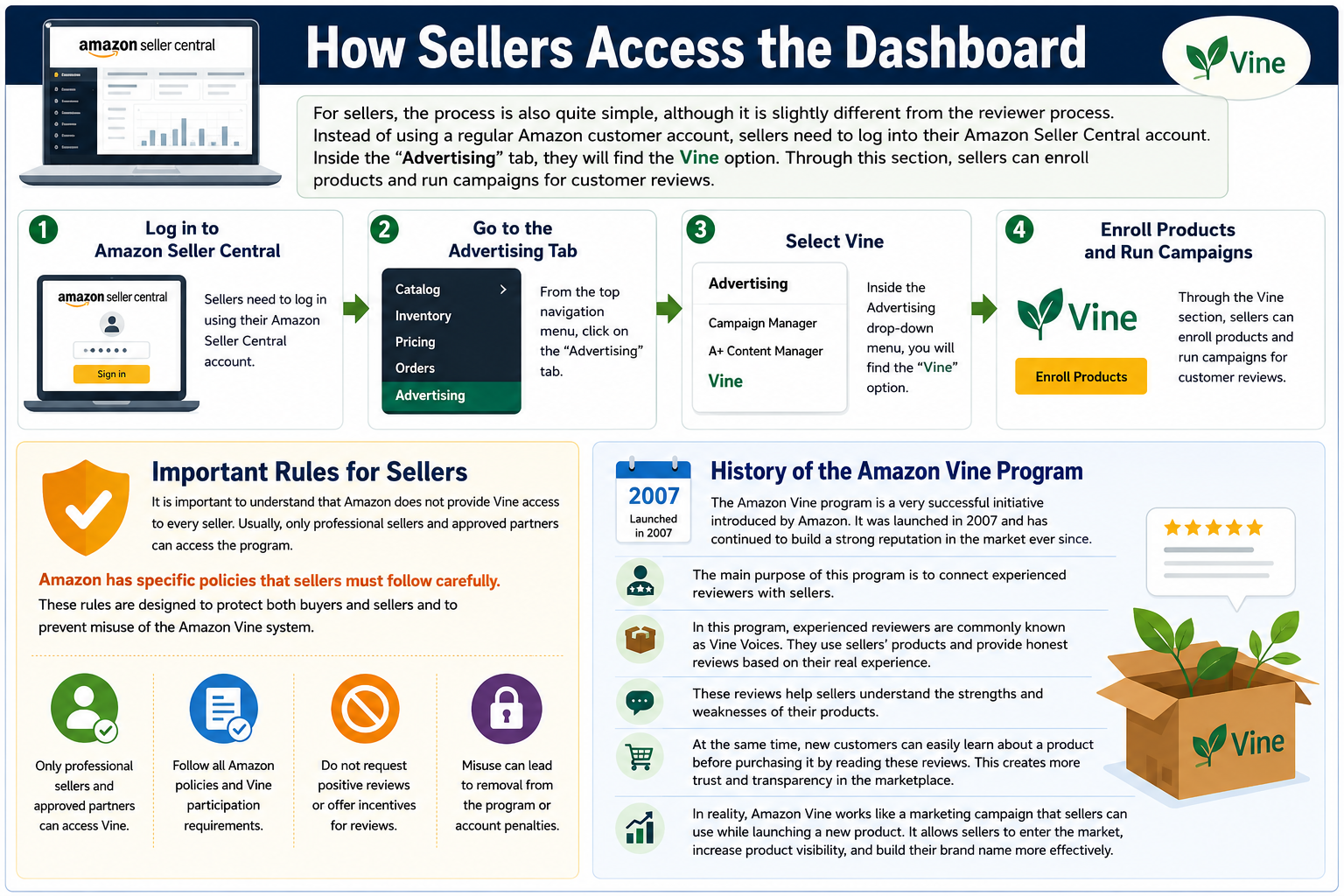
For sellers, the process is also quite simple, although it is slightly different from the reviewer process. Instead of using a regular Amazon customer account, sellers need to log into their Amazon Seller Central account. Inside the “Advertising” tab, they will find the Vine option. Through this section, sellers can enroll products and run campaigns for customer reviews.
Important Rules for Sellers
It is important to understand that Amazon does not provide Vine access to every seller. Usually, only professional sellers and approved partners can access the program. Amazon has specific policies that sellers must follow carefully. These rules are designed to protect both buyers and sellers and to prevent misuse of the Amazon Vine system.
History of the Amazon Vine Program
The Amazon Vine program is a very successful initiative introduced by Amazon. It was launched in 2007 and has continued to build a strong reputation in the market ever since. The main purpose of this program is to connect experienced reviewers with sellers.
In this program, experienced reviewers are commonly known as Vine Voices. They use sellers’ products and provide honest reviews based on their real experience. These reviews help sellers understand the strengths and weaknesses of their products.
At the same time, new customers can easily learn about a product before purchasing it by reading these reviews. This creates more trust and transparency in the marketplace.
In reality, Amazon Vine works like a marketing campaign that sellers can use while launching a new product. It allows sellers to enter the market, increase product visibility, and build their brand name more effectively.
Also Read- Best Mobile App Development Companies in 2026 for AI-Powered Solutions
How Much Fee Does a Seller Pay for the Amazon Vine Program?
When a seller joins the Amazon Vine program, they are required to pay a certain fee. However, the good thing is that Amazon does not charge this fee immediately. Instead, Amazon gives sellers some time and waits until the first review is published. Around seven days after the first review appears, the bill is generated, and the seller has to pay the fee.
For example, suppose a seller enrolls a new mobile phone in the Vine program. When a Vine Voice uses the product and publishes a review, Amazon generates the seller’s bill only after that first review is posted. One important thing to note is that if no review is published within the first 90 days, Amazon does not charge any fee.
Another important point is that some products come in different colors or sizes, which are known as child ASINs. Amazon does not charge separate fees for these child ASINs. The fee is applied only to the main or parent ASIN.
Let me explain this with a simple example. Suppose a seller enrolls a product in the Vine program, but no reviewer has claimed it yet. In this situation, the seller can still cancel the enrollment. However, once a Vine Voice requests the product, the seller can no longer change the enrollment terms or re-enroll the same ASIN into the program.
This is one of Amazon’s strict policies that applies to all sellers. These rules are designed to improve the experience for both sellers and reviewers and help prevent misuse of the program.
Quick Summary
The login process for Amazon Vine is very simple, just like logging into your regular Amazon account. Usually, users do not face major problems, but if an error appears, there is no need to worry. Most of these errors are very common in nature and happen because of small mistakes made during login.
For example, if you enter the wrong password multiple times, Amazon may temporarily lock your account for security reasons. However, you can try again after around 30 minutes. Sometimes users also have multiple Amazon accounts connected with different email addresses, and entering the wrong email ID can also cause login errors. By carefully checking these small details, you can easily avoid most login problems.
Overall, Amazon Vine is an excellent program designed for the benefit of both sellers and buyers. Sellers get an opportunity to introduce their new products to the market and build their presence more effectively.
At the same time, buyers can read honest reviews before purchasing a product. This helps customers understand the quality, features, and real-life benefits of newly launched products before making a buying decision.
Frequently Asked Questions
-
Is Amazon Vine Available in Every Country?
No, I do not think Amazon Vine is available in every country. The program is officially available only in selected regions. It is more popular in countries where Amazon already has a very large market and customer base.
-
Can Sellers Choose Which Reviewer Receives Their Product?
No, this is not Amazon’s policy. Only the users who receive official Vine invitations from Amazon can access products and submit reviews. Sellers cannot personally choose reviewers for their products.
-
Can Vine Reviewers Earn Money Through Reviews?
Amazon Vine reviewers do not receive direct payments for writing reviews. Instead, they get the opportunity to use products for free, and this is considered the main benefit they receive from the program.
-
How Long Does It Take for a Vine Review to Appear?
This completely depends on the reviewer. The process also depends on how quickly the reviewer receives the product. After receiving it, they need time to use and test the item before writing an honest review. Sometimes reviews appear within a few days, while in other cases it may take several weeks.
-
Can a Seller Delete a Bad Vine Review?
No, Amazon does not allow sellers to remove negative Vine reviews simply because they dislike them. Once a Vine reviewer submits an honest review, it usually remains published unless it violates Amazon’s policies. One important purpose of this program is to ensure that only quality products perform well in the market and customers receive honest feedback.