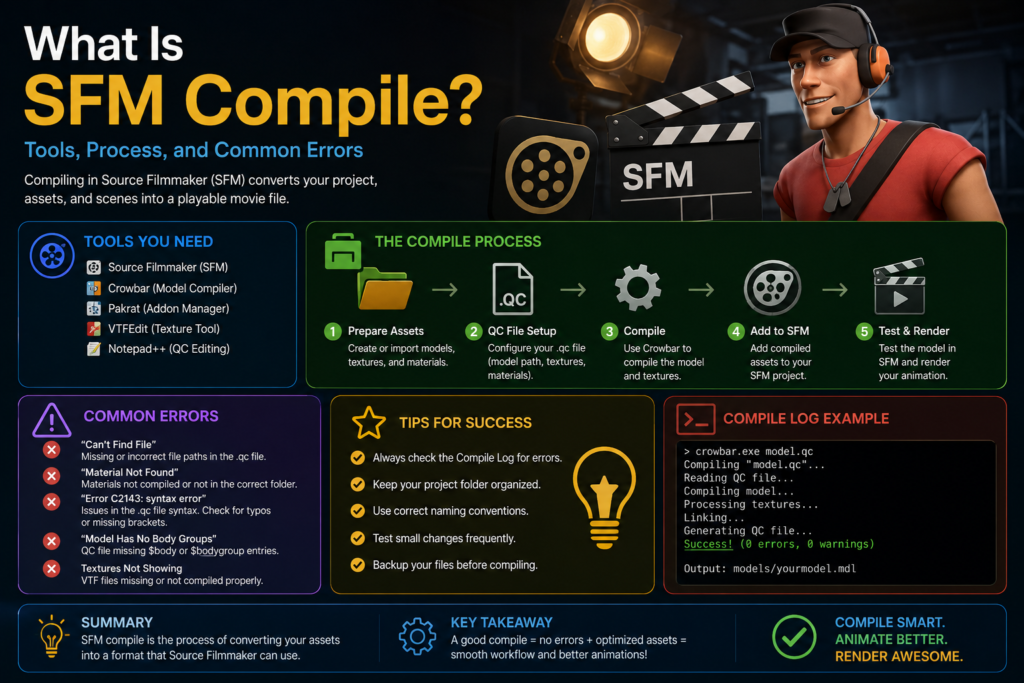
What Is SFM Compile? Tools, Process, and Common Errors
+
Table of Contents
- 1 How Does SFM Compile Work?
- 2 Common SFM Compile Errors
- 2.1 Broken Models
- 2.2 Missing Textures
- 2.3 Animation Errors
- 2.4 Software Crashes
- 2.5 Guide for Beginners
- 2.5.1 Start With Simple Models
- 2.5.2 Keep Files Organized
- 2.5.3 Double-Check Compile Settings
- 2.5.4 Learn From Errors
- 2.6 Be Patient
- 2.7 My Personal Experience With an SFM Compile Error
- 3 Quick Summary
- 3.1 FAQs
- 3.1.1 Do I need coding knowledge for SFM Compile?
- 3.1.2 Which software is commonly used for SFM Compile?
- 3.1.3 Why does my model appear purple in SFM?
- 3.1.4 Can beginners learn SFM Compile easily?
- 3.1.5 What is the most important file in SFM Compile?
- 3.1.6 Can an incorrect compilation crash Source Filmmaker?
SFM Compile is the process of converting raw 3D model files into a usable format. In this way, Source Filmmaker can properly understand and use it.
In simple words, it transforms files like .SMD or .DMX into .MDL files that work smoothly inside the Source Engine.
Models may appear broken without proper compilation. It may look incomplete, and sometimes textures may fail to load correctly. There is a possibility that the software may even crash while opening the file.
This process ensures that characters and animation work properly inside Source Filmmaker.
How Does SFM Compile Work?
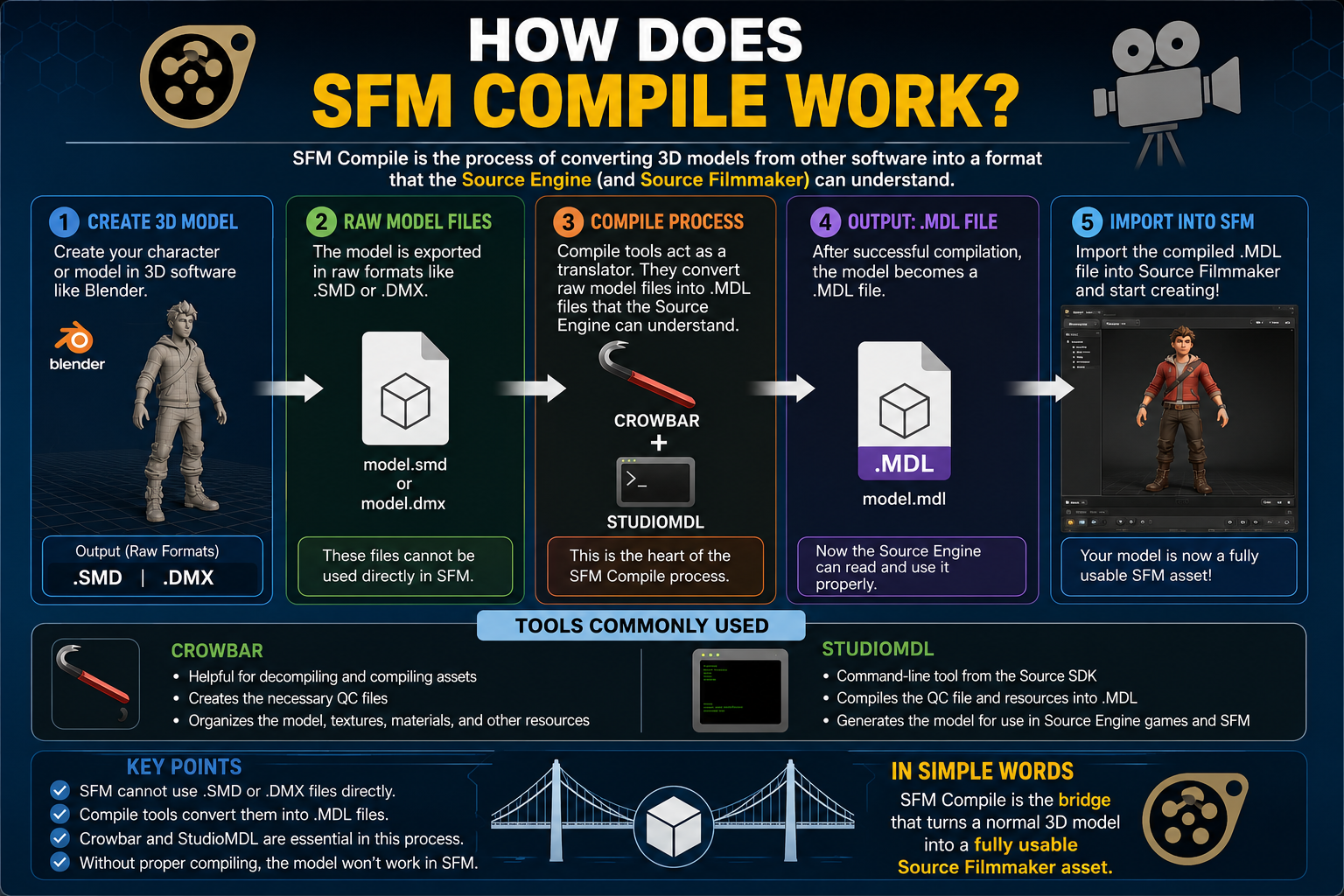
When I first heard the term “SFM Compile,” I honestly thought it was some kind of complicated coding process. But after exploring Source Filmmaker and different 3D tools, I realized the workflow is actually very simple to understand.
The process usually starts with creating a 3D character in software like Blender. These characters are normally saved in raw formats such as .SMD or .DMX but Source Filmmaker cannot be used directly with these characters.
That is where the compile process becomes important.
You can say that compile tools basically act like a translator between the 3D software and Source Filmmaker. They convert raw model files into .MDL files. In this way, the Source Engine can properly understand.
Once the compilation is completed successfully, the characters can be imported into SFM without any issues.
During my research, I also found that tools like Crowbar and StudioMDL are commonly used for this process. They help organize characters into a working format. Without proper compiling, it dosent works.
In simple words, SFM Compile is the bridge that turns a normal 3D model into a fully usable Source Filmmaker asset.
Also Read- Features to Look for in a Loyalty App for Small Businesses (Before You Invest)
Main File Formats Used in SFM Compile
One thing that confused me the most was the different file formats. At first, names like .SMD, .DMX, .MDL and QC looked very technical to me. But I realized that each file has a specific job in the compilation process after spending some time.
The first formats I came across were SMD and DMX. These are raw 3D model files that usually contain character models. Many creators export these files from 3D software like Blender before moving them into Source Filmmaker.
Secondly, .MDL format is probably the most important file in the entire process. This is the final compiled file that Source Filmmaker and the Source Engine can actually read. Without the .MDL file, models usually cannot load correctly inside SFM.
Another interesting file that you should know is.QC script file. In simple words, this file tells the compiler how the model should behave. It contains instructions and model settings.
Understanding these formats made the whole SFM Compile workflow much easier. You will understand the whole process once you understand what each file does.
Common SFM Compile Errors
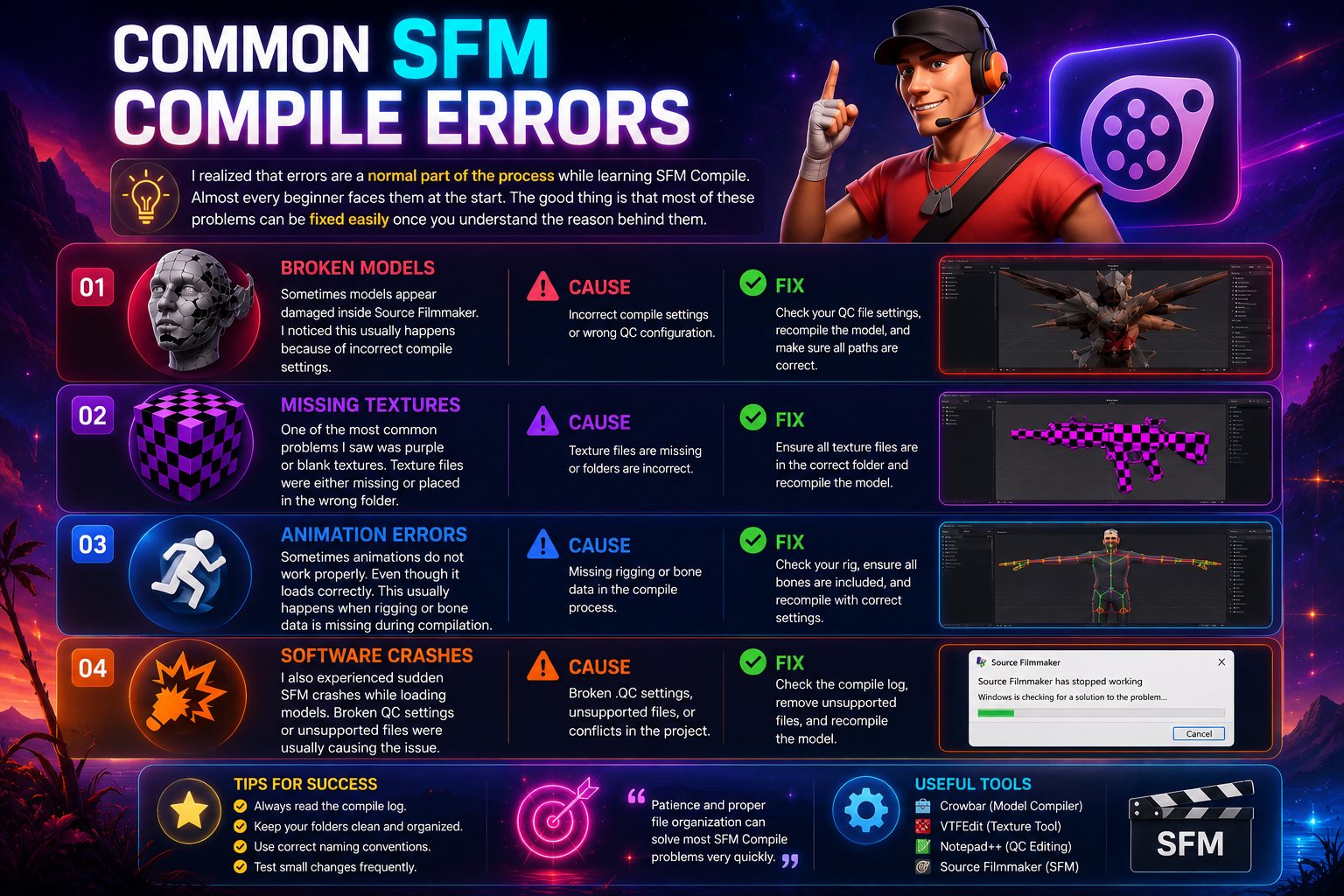
I realized that errors are a normal part of the process while learning SFM Compile. Almost every beginner faces them at the start. The good thing is that most of these problems can be fixed easily once you understand the reason behind them.
Broken Models
Sometimes models appear damaged inside Source Filmmaker. I noticed this usually happens because of incorrect compile settings. You can fix this error by fixing its settings.
Missing Textures
One of the most common problems I saw was purple or blank textures. Texture files were either missing or placed in the wrong folder. Always place it in the right folder. You can fix this problem in this way.
Animation Errors
Sometimes animations do not work properly. Even though it loads correctly. This usually happens when rigging or bone data is missing during compilation. You have to fulfill missing data.
Software Crashes
I also experienced sudden SFM crashes while loading models. Broken.QC settings or unsupported files were usually causing the issue.
Patience and proper file organization can solve most SFM Compile problems very quickly.
Guide for Beginners
I made many small mistakes when I first started learning SFM Compile. Mistakes like broken models and missing textures. I realized that a few simple habits can make the entire process much easier over time.
Start With Simple Models
I recommend starting with basic models first instead of complex animated characters. This helps you understand the compile process.
Keep Files Organized
One thing that helped me the most was organizing files into proper folders. Always keep files in the correct location.
Double-Check Compile Settings
I always check the.QC settings and file paths carefully before compiling. A small mistake here can create major errors later.
Learn From Errors
Errors felt frustrating to me at first. But later I realized that every error teaches something important about the workflow.
Be Patient
SFM Compile may feel difficult in the beginning, but it becomes much easier with practice. The entire workflow starts making sense once you understand the basics.
My Personal Experience With an SFM Compile Error
One of the most frustrating moments I experienced while learning SFM Compile happened when I tried importing my first character model into Source Filmmaker. I created a simple character in Blender and exported it successfully. I thought everything was ready to use at that time.
But the character appeared completely purple, and some body parts were missing when I loaded it. I thought the model itself was broken. I spent hours trying different compile settings. But nothing worked.
I discovered that the real problem was missing texture paths after deep research. The texture files were saved in the wrong folder. That‘s why Source Filmmaker could not find them during compilation. Everything started working properly once I moved the texture files into the correct materials folder.
That experience taught me an important lesson. Most SFM Compile errors are usually small mistakes related to file organization and settings. Do not panic if you are facing similar issues. Carefully check your folders, texture paths, and.QC settings. There is nothing else you need to do.
Quick Summary
Learning SFM Compile felt confusing to me in the beginning. It is because of the different tools and technical terms involved in the process. But I have understood the workflow step by step. I realized that the main goal is simply to prepare 3D models so they can work correctly inside Source Filmmaker.
I found that small mistakes can create major problems during my learning experience. The process became much smoother once I started checking files carefully.
My suggestion is to start with simple projects. If you are new to SFM Compile. The workflow becomes much easier with time.
FAQs
-
Do I need coding knowledge for SFM Compile?
No, basic things can be learned without advanced coding knowledge. But understanding simple .QC commands can help a lot.
-
Which software is commonly used for SFM Compile?
Many creators use Blender, Crowbar, and StudioMDL for creating models for Source Filmmaker.
-
Why does my model appear purple in SFM?
This usually happens because texture files are sometimes missing or placed in the wrong folder.
-
Can beginners learn SFM Compile easily?
Yes, beginners can learn it with practice. The workflow becomes easier after understanding the basics.
-
What is the most important file in SFM Compile?
The .MDL file is one of the most important files because Source Filmmaker reads this compiled format.
-
Can an incorrect compilation crash Source Filmmaker?
Yes, broken files or wrong settings can sometimes cause Source Filmmaker to crash.