OpenDream AI: Turn Ideas Into Stunning Art
+
Table of Contents
- 1 OpenDream AI at a Glance
- 2 What is OpenDream AI?
- 2.1 Key Features
- 2.1.1 Text to Art
- 2.1.2 Different Models
- 2.1.3 Template
- 2.1.4 Specialized Task
- 2.1.5 Easy Interface
- 2.2 Pricing
- 2.2.1 Free Plan
- 2.2.2 Paid Plan
- 2.2.3 Extra Option
- 2.3 Art Ownership
- 2.3.1 Advantages
- 2.3.2 Disadvantages
- 2.4 OpenDream AI Alternatives
- 3 Quick Summary
There was a time when every artwork was done manually. People used to work on software like CorelDRAW and Photoshop to create their graphic designs. But now that time is over.
AI is doing the same work. You just need to know how to use it. You can get the best artwork through it.
OpenDream AI is the best example of this. You can create all kinds of artwork from this.
OpenDream AI at a Glance
| Official website | https://opendream.ai/ |
| Key Features |
|
| Art Ownership Rights | Users who create images |
| Best For | Content creators |
| Pricing |
|
What is OpenDream AI?
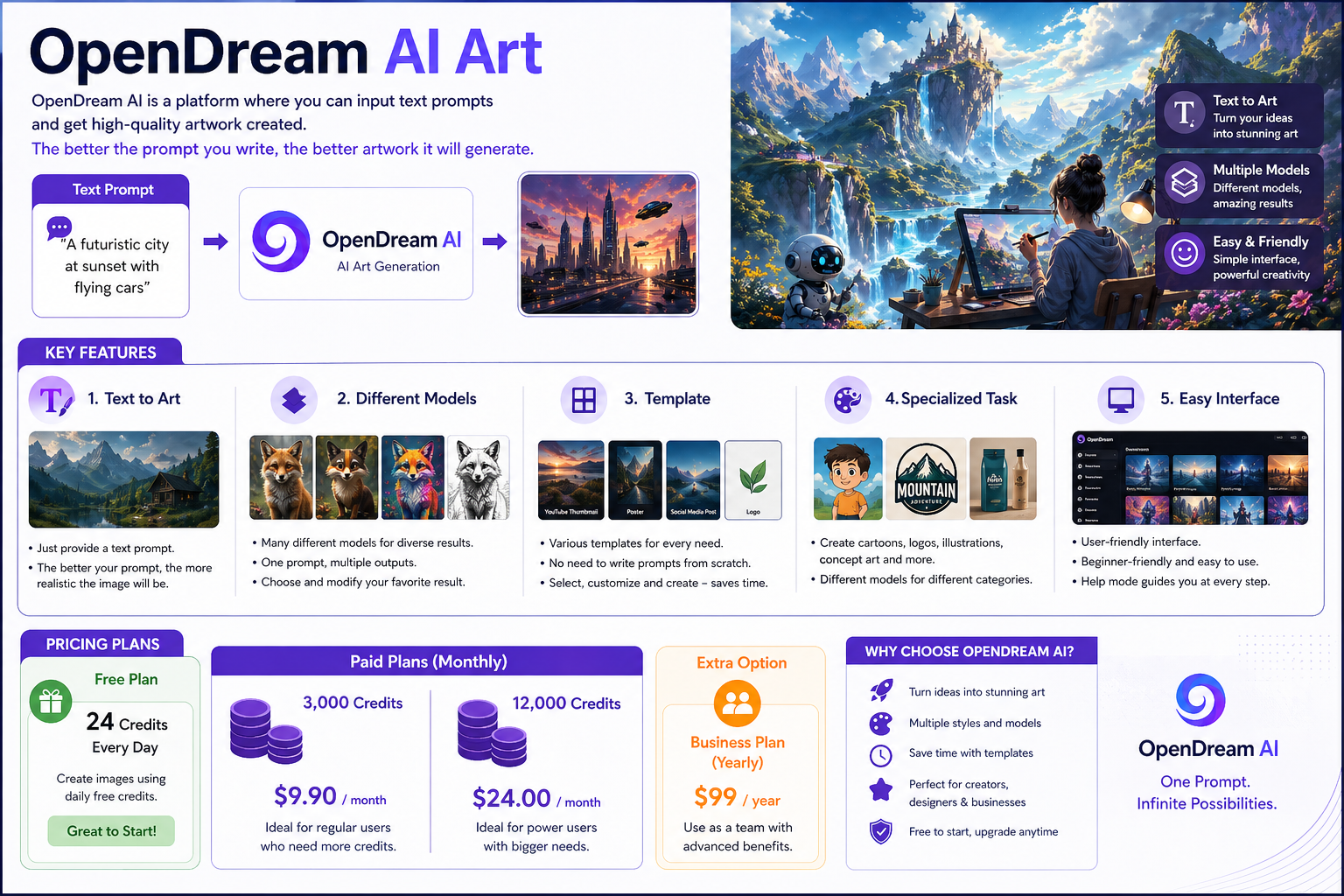
This is a platform where you can input text and get high-quality artwork created. It works based on your text prompts. The better the prompt you write, the better artwork it will generate.
You can use it to design thumbnails for your YouTube videos. It also provides you with new ideas that were not possible manually.
Key Features
Text to Art
The biggest advantage of this tool is that you only need to provide text input. In technical language, this is called a “prompt.”
You just need to know how to write a good prompt. The better your prompt is, the more realistic the image will be.
Different Models
This is a very useful platform. It offers you many different models. Each model can generate different types of results.
When you provide a single prompt, it produces outputs using different models and shows you multiple results.
You can then choose the result you like and modify it according to your preference.
Template
This is a platform that also provides various templates. It’s not necessary to write a prompt from scratch. You can select any template and modify it according to your image needs.
I have personally experienced this, and I’ve gotten very good results.
For example, when I need to create an image in a specific size, I simply select a template based on that requirement and then make modifications within it to generate my image. This saves a lot of time.
Also Read – Candy AI: Your Next AI Chat Obsession
Specialized Task
This is a tool that produces different types of artwork. You can even create cartoon characters with it. It is perfect for logo design, also. I have created many logos using it and got excellent results.
One of its specialties is that it offers specific features for different categories. You don’t need to rely on just one model for everything. You can use its different models to generate various types of artwork.
Easy Interface
Its interface is very friendly. Even a beginner can easily use it. When I used it for the first time, I didn’t face any difficulties. It also provides a help mode feature that guides you at every step.
Pricing
Free Plan
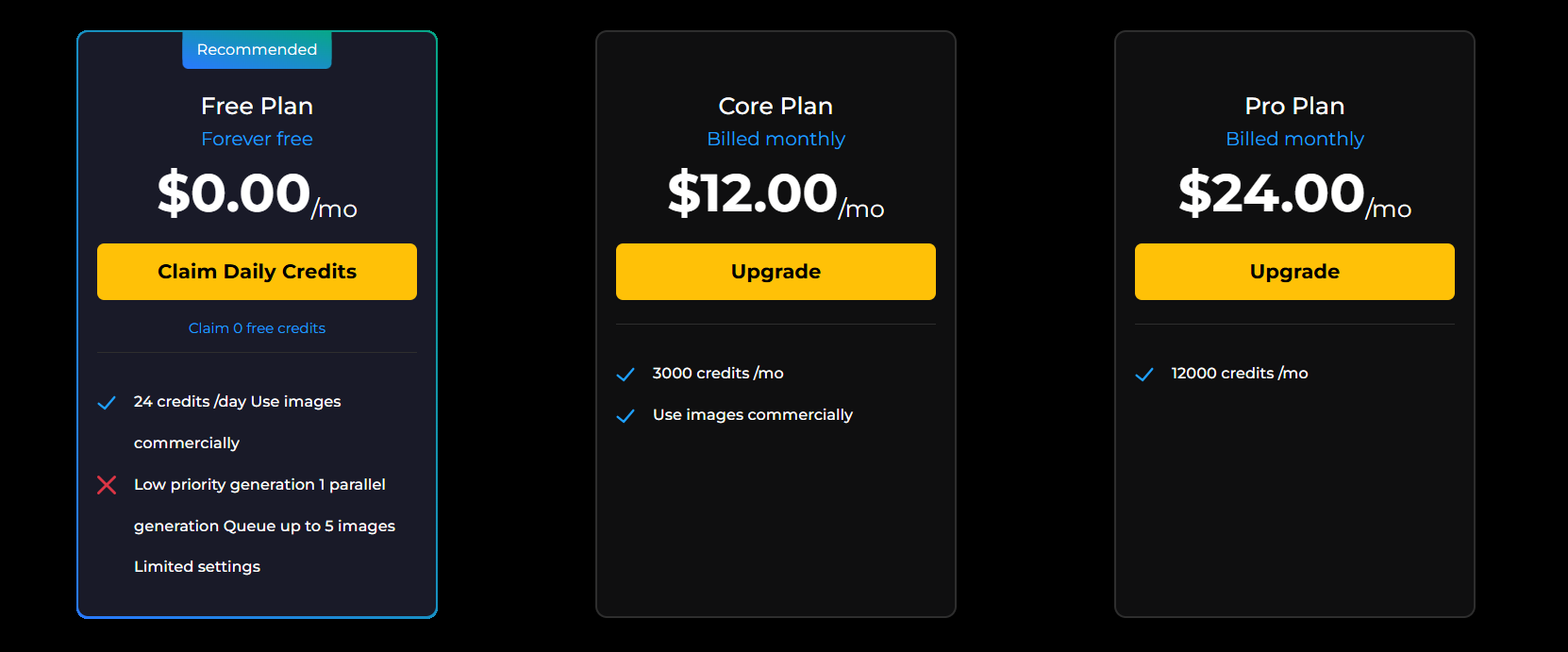
The basic plan for this is completely free. In the basic plan, you get 24 credits on a daily basis. You can create images using these credits. In my opinion, this is enough to start with.
Paid Plan
In this, you get two types of paid plans. One is a 3,000 credits plan, and the other is a 12,000 credits plan. The 3,000 credits plan costs around $9.90 per month, while the 12,000 credits plan costs around $24 per month.
You can select the plan according to your requirements.
Extra Option
It also offers a yearly business plan, which you can use as a team. This plan is available for around $99 per year.
Art Ownership
This is a very important question. You might also wonder if you create artwork using this tool, who owns it?
The simple answer is simple: you own it.
Because you provided the prompt and created the artwork, the ownership belongs to you. You can freely use it anywhere, and there are no restrictions, even for commercial use.
I personally create my artwork using this platform and use it for business purposes.
Advantages
In my opinion, it has many advantages. First, it saves you a lot of time. Second, one of the biggest advantages is that it enhances your creativity. Since I started using it, my work has become much more unique.
You don’t need to learn any technical skills. You just need to guide it properly and can get results according to your needs.
Disadvantages
Every tool has its advantages, but it also comes with some disadvantages. For example, if you want to make changes to an image from a specific angle, it can sometimes be difficult. On the other side, making those same changes using manual software can be easier.
OpenDream AI Alternatives
Overall, this is a great platform. However, there are also other web services available in the market that create artwork. I have also experienced them, and some of them are listed below.
- Playground AI
- Krea AI
- BlueWillow AI
- Lexica Art
- Mage.space
Quick Summary
I believe we should move with the times. There was a time when people used to create images manually on paper. Then came a phase when people started using tools like CorelDRAW and Adobe Illustrator. But now, times have completely changed.
Today, people are doing all this work through AI. By learning it a little, you can use it effectively for your work.
FAQs
-
Who should use OpenDream AI?
Many content creators and freelancers can use it to get work done.
-
Do I need coding for this?
You don’t need any coding at all. You can simply view the task and generate images easily.
-
Who owns the copyright of the images created through it?
The user who generates the images owns the copyright.
-
Can I create abstract art using it?
Yes, you can create abstract art. It completely depends on your prompt.
-
Do I need to write separate text prompts for each model?
No, you only need to provide the prompt once. On a single platform, you can get different results from different models.